The Complete EuropAce Aircon Error Code Directory (2026): Diagnostic Guide for Singapore Homeowners
July 20, 2026
R32 vs R410A Refrigerants: What Singapore Homeowners Need to Know in 2026
July 22, 2026Smart Aircons in 2026: Using Wi-Fi Apps to Track and Lower Cooling Bills
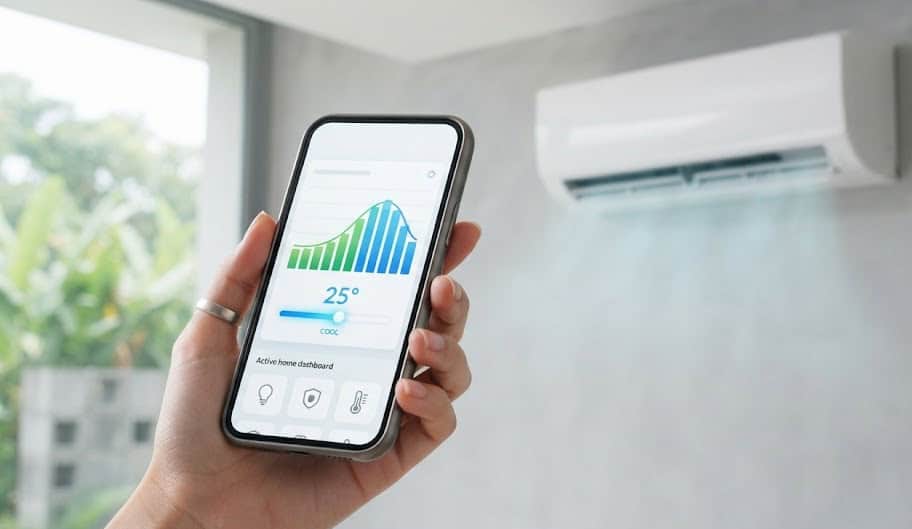
Utilizing advanced mobile application metrics to audit daily electricity consumption and optimize inverter compressor cycles.
Smart Aircons in 2026: Using Wi-Fi Apps to Track and Lower Cooling Bills
Struggling with rising electricity tariffs is a common conversation topic in Singapore these days. With utility rates climbing, keeping your HDB flat or condo cool has become a major monthly expense. Many of us dread opening our SP Services bill at the end of the month, especially after a prolonged period of hot weather. We’ve all been there: coming home after a sticky, exhausting commute from the CBD and immediately blasting the living room aircon on a freezing 18-degree setting. While that initial blast of cold air feels amazing, it forces your compressor to run at maximum speed, driving up your power bill.
In this climate, traditional cooling strategies are no longer enough. To keep your household bills under control, you need visibility. You cannot manage what you do not measure. This is why smart aircon Singapore systems are quickly transitioning from a premium novelty to an absolute household necessity. By connecting your air conditioning units to your home Wi-Fi network, you can monitor exactly how much electricity each fancoil consumes in real-time, helping you make smart, cost-effective adjustments.
This guide looks closely at how modern smart aircon systems work. We will explore how to set up and troubleshoot brand-specific applications, examine the actual hardware behind energy tracking, and show you how to use remote scheduling and automation to lower your monthly bills.
What Makes an Aircon “Smart” in 2026?
For many years, controlling an aircon simply meant pointing a plastic infrared (IR) remote at the unit and pushing buttons. While this is simple, it is also a blind process. Your remote has no idea how much electricity the system is consuming, whether a sensor is failing, or if you accidentally left the study room aircon running when you rushed out to catch the bus.
Modern smart air conditioning systems utilize integrated Internet of Things (IoT) technologies to establish a direct, two-way communication channel between your phone and your physical cooling equipment. This digital link relies on three key technologies.
Real-Time Wattage Monitoring
Unlike basic systems that only estimate power usage based on run time, high-quality smart aircons feature dedicated current transformers (CT sensors) built directly onto the outdoor compressor’s printed circuit board (PCB). These CT sensors continuously measure the exact electrical current flowing into the compressor and fan motors. This live electrical data is transmitted via local bus lines to the indoor fancoil’s Wi-Fi communication chip, which uploads it to a secure cloud server. The companion mobile app then converts these raw electrical signals into clean, easy-to-read kilowatt-hour (kWh) graphs and estimated dollar figures, allowing you to see exactly how much money your aircon is using every hour.
Cloud-Enabled Inverter Regulation
When your aircon is connected to the cloud, it does not just receive basic on/off commands. The system’s cloud platform runs predictive algorithms that analyze your usage patterns, indoor temperature drops, and even local weather forecasts. For example, if the app detects that the outdoor temperature is dropping during a midnight thunderstorm, it can proactively command your compressor to lower its operating frequency (Hz) sooner. This prevents unnecessary cooling cycles and keeps your electricity bills down without you having to touch your remote control.
Geofencing and Automated Scheduling
Geofencing uses your smartphone’s GPS location to create a virtual boundary around your home or HDB estate. When your phone crosses this boundary, the smart app automatically triggers specific commands. For example, the system can automatically switch off all fancoils the moment you walk 200 meters away from your block, ensuring you never waste electricity on an empty flat. Similarly, it can pre-cool your bedroom when you are on your way home, running the compressor at a highly efficient, slow ramping speed instead of requiring a high-power “Turbo” run when you arrive.
Platform Deep Dive: Panasonic Comfort Cloud
Panasonic was an early pioneer in smart home integration, and their Comfort Cloud platform remains one of the most reliable systems for tracking and optimizing your cooling usage in Singapore.
The Comfort Cloud application connects seamlessly with their premium residential systems, including the XS and YS series. Its key feature is its highly accurate energy consumption auditing tool. The app displays your power usage in clean, interactive bar charts, letting you compare your consumption across days, weeks, months, or years. You can even input your current SP Services tariff rate per kWh, allowing the app to calculate your running costs in actual dollars and cents.
Additionally, Comfort Cloud allows you to manage up to 200 units from a single device, which is highly useful for landlords managing multiple rental properties or office managers handling commercial spaces. You can set weekly timers to align with your office hours, monitor active temperatures remotely, and receive instant push notifications if a unit requires servicing or experiences a system error. To find out more about these smart systems and view specific model options, you can explore our Panasonic aircon installation and service page.
Platform Deep Dive: Daikin Mobile Controller
Daikin’s approach to home automation focuses on robust remote control and seamless smart home integration. Their dedicated application, the Daikin Mobile Controller (often called D-Mobile), turns your smartphone into a highly responsive, remote command center.
D-Mobile is designed to work with their popular residential series, such as the Daikin iSmile Eco. It allows you to control the on/off status, temperature settings, fan speeds, and horizontal or vertical louver directions of your units from anywhere in the world. This is highly useful for pet owners who want to keep their home comfortable during hot afternoons, or parents who want to adjust their children’s bedroom temperature remotely after they fall asleep.
What’s more, the Daikin Mobile Controller acts as an early warning system for your equipment. If your unit experiences a fault, such as a refrigerant leak or a clogged drain line, the app does not just flash a generic warning light. It sends a push notification with the exact diagnostic error code (such as “U4” for transmission errors or “A6” for fan motor lockups). This live diagnosis allows you to share the code with your service technician immediately, ensuring they bring the correct replacement parts on their first visit. You can read more about these smart units and check local installation pricing on our Daikin aircon systems page.
| Smart Platform Feature | Panasonic Comfort Cloud | Daikin Mobile Controller (D-Mobile) | Generic Smart IR Blaster + Smart Plug |
|---|---|---|---|
| Energy Tracking Accuracy | High (Direct CT Sensor Audit) | High (Direct Compressor Feedback) | Low (Estimates based on total wall plug load) |
| Weekly Timer Resolution | Up to 6 patterns per day | Up to 4 patterns per day | Basic on/off schedules only |
| Error Diagnostic Depth | Full structural code readout | Full live sensor code readout | None (Cannot read internal unit faults) |
| Out-of-Home Cloud Control | Yes (Via Panasonic Cloud Server) | Yes (Via Daikin Cloud Server) | Yes (Depends on third-party app) |
| Louver / Airflow Direction Control | Yes (Full vertical & horizontal sweep) | Yes (Full structural control) | No (Standard IR blasters only send raw on/off) |
The Power Profile: Automated vs. Manual Systems
Homeowners often believe that turning their aircon off and on manually whenever they feel slightly warm is the best way to save electricity. In reality, this manual cycling is highly inefficient. Every time you turn an aircon off, the room warms up, and the walls absorb heat. When you turn it back on, the compressor has to run at maximum speed (ramping up to over 100Hz) to bring the temperature down. This creates a massive power spike.
In contrast, a smart automated system uses weekly schedules, sleep modes, and geofencing to maintain a steady, highly efficient cooling cycle. It cools the space gently and keeps the compressor running at its lowest, most efficient maintenance frequency, resulting in lower power bills.
As the chart clearly shows, while the smart automated system has an initial power spike when starting up, it quickly settles into a highly efficient, low-power state. The manual user, on the other hand, experiences multiple massive power spikes throughout the day, resulting in significantly higher cumulative energy consumption. This difference demonstrates how smart automation helps lower your monthly electricity bills.
Step-by-Step Brand-Specific Master Setup & Connection Guide
While smart air conditioning applications offer incredible control, setting them up can sometimes be frustrating. Many homeowners encounter connection drops, pairing loops, or find their fancoils showing as “Offline” in the app. In Singapore’s high-density housing, where concrete structural walls block wireless signals and dozens of neighbor Wi-Fi networks compete for bandwidth, understanding how to configure your setup is key to a reliable connection.
Understanding the 2.4GHz vs. 5GHz Wireless Conflict
The single most common reason smart aircon pairing fails is router band steering. Modern Wi-Fi routers supplied by local telcos like Singtel, StarHub, or M1 combine both the 2.4GHz and 5GHz wireless bands into a single network name (SSID). Your phone automatically connects to the faster 5GHz band.
However, almost all smart aircon Wi-Fi adapters only contain 2.4GHz radio modules. This is an intentional engineering choice because 2.4GHz signals have a longer wavelength, allowing them to penetrate thick concrete HDB walls much better than 5GHz signals. When you try to pair the fancoil using your phone, the app detects that your phone is on 5GHz while the aircon is trying to connect on 2.4GHz, causing the setup process to fail.
To bypass this issue, you should log into your home router’s admin settings panel and temporarily disable the “Smart Steering” or “Dual-Band Coexistence” feature. Separate your Wi-Fi into two distinct network names (for example, “Home_Network” and “Home_Network_2.4G”). Connect your smartphone to the 2.4G network, carry out the aircon pairing process, and once the connection is successful, you can safely re-enable your router’s smart steering features.
Step-by-Step Guide for Panasonic Comfort Cloud
If you are setting up a Panasonic unit with a built-in or external smart adapter, follow this systematic pairing sequence:
- Download and Register: Install the Panasonic Comfort Cloud app and create a secure account. Ensure your smartphone is connected to your dedicated 2.4GHz Wi-Fi band.
- Prepare the Fancoil: Grab a ladder and locate the “WLAN” button or indicator light on your fancoil’s display panel. Press and hold the WLAN button until the green LED starts flashing rapidly, indicating the adapter is in AP (Access Point) broadcast mode.
- Add Device: In the app, tap the “+” icon, select “Split Air Conditioner,” and choose “Internal Wi-Fi Adapter.” The app will prompt you to scan the unique QR code located on the side of the fancoil casing or inside the front plastic cover.
- Direct Connection: If the QR scan fails, manually select “Connect via AP Mode.” Go to your phone’s Wi-Fi settings, connect to the temporary network broadcasted by the fancoil (usually starting with “Panasonic_”), enter the default password printed on the adapter label, and return to the app to input your home Wi-Fi password.
Step-by-Step Guide for Daikin Mobile Controller
Daikin’s pairing process relies on establishing a secure link between your D-Mobile app and the physical WPS button on your router, or using direct AP mode:
- Prepare the Adapter: Open the front cover of your Daikin fancoil. Ensure the smart adapter’s “Power” LED is lit. Press the “RUN” button on the adapter for 5 seconds until the “AP” LED begins to flash.
- Pairing via App: Open the D-Mobile app. It will automatically scan your local network for compatible Daikin adapters. Tap “Configure Wireless Adapter” and select the SSID corresponding to your unit’s serial number.
- Network Handshake: Input your home Wi-Fi password. The adapter’s AP LED will stop flashing and the “RUN” LED will light up solid green, indicating a successful handshake with your router.
- Out-of-Home Activation: Tap the settings icon in the D-Mobile app and enable “Out-of-Home Control.” This registers your adapter with Daikin’s global cloud server, letting you control your units when using mobile data outside your home.
The Hidden Cost of Bad Wi-Fi: Signal Dropping & Continuous Ramping
Many homeowners treat a dropping Wi-Fi connection as a minor annoyance, assuming the aircon will simply run like a standard, non-smart unit when disconnected. In reality, a poor Wi-Fi connection can silently spike your monthly electricity bills.
When you use a smart app to run your system, the fancoil continuously exchanges data with the brand’s cloud servers. This data includes temperature telemetry, sensor readings, and fan speed adjustments. If the Wi-Fi connection drops unexpectedly during a cooling cycle, the fancoil’s internal microcontroller can experience cloud latency issues.
When this happens, some smart fancoils enter a safe, fail-safe fallback state to prevent the room from warming up. In this fallback state, the fancoil’s control board may stop sending variable frequency commands to the outdoor compressor. As a result, the inverter compressor stays “locked” in its medium or high ramping speed (for example, running continuously at 55Hz or 60Hz) instead of cycling down to its ultra-low, energy-saving maintenance frequency (15Hz). This continuous high-speed running wastes electricity, leading to higher bills at the end of the month.
To avoid this hidden cost, ensure your outdoor compressor ledge or indoor fancoils receive a strong, stable Wi-Fi signal. If you live in a larger 4-room or 5-room HDB flat with thick concrete bomb shelter walls, installing a dedicated Wi-Fi mesh node near your living room or bedrooms is a smart way to ensure your aircons maintain a stable connection.
To help you estimate your potential monthly and yearly savings from upgrading to a smart, automated system, we have developed this interactive ROI and Tariff Calculator.
Smart Aircon ROI & Tariff Calculator
Calculate your monthly and long-term savings by implementing smart scheduling and geofencing.
Your Savings Output:
Estimated Monthly Savings: $81.65 SGD
Estimated 5-Year Cumulative Savings: $4,898.88 SGD
Excellent ROI. Implementing full smart automation with geofencing minimizes wasted run times and optimizes your compressor’s cooling cycles, helping you save significantly on your SP Services utility bill.
5-Year Financial Projection of Smart Optimization
To see how these savings accumulate over a longer period, let us compare the five-year cumulative cost of running a standard System 3 aircon under standard manual control against a system optimized with smart scheduling and automation.
The table below provides a realistic cost breakdown of both pathways, helping you make an informed decision for your household budget.
| Cost Component (5-Year Outlook) | Scenario A: Standard Remote Control (Manual Operation) | Scenario B: Smart Automated Setup (Wi-Fi Control) |
|---|---|---|
| Initial Adapter/Wi-Fi Setup Cost | $0 | $150 (Avg. built-in adapter option cost) |
| Annual Preventative Servicing | $750 ($150/year) | $750 ($150/year standard service) |
| Cumulative Electricity Bills | $6,990 (Avg. $116.50/month with manual cycles) | $4,545 (Avg. $75.75/month with 35% smart savings) |
| Total 5-Year Financial Commitment | $7,740 | $5,445 |
As the calculations show, within just five years, implementing smart scheduling and automation saves you a net total of $2,295. This significant saving demonstrates that the small upfront cost of a smart Wi-Fi adapter pays for itself within months of active energy auditing and automation.
Professional Verification & Engineering Assurance: Evaluating these complex regulatory and mechanical requirements is much easier with professional support. Operating as an NEA-Licensed cleaning and technical service contractor since 2011, our expert team has built trusted relationships with over 43,000 Facebook followers and maintains a solid 4.8-star Google review rating. We carry out structural checks, pressure testing, and chemical restorations with complete transparency, ensuring your home remains cool and fully compliant with all local housing guidelines.
Frequently Asked Questions about Smart Aircons
Is it safe to connect my aircon to my home Wi-Fi, or is there a hacking risk?
Connecting your air conditioning system to your home Wi-Fi network is highly safe. Premium brands like Panasonic and Daikin use secure, encrypted communication protocols to connect your smart adapters with their global cloud servers. These connections utilize modern SSL/TLS encryption standards, which are similar to the security technologies used in online banking apps, ensuring your smart home remains secure and protected from unauthorized access.
Why does my smart aircon app constantly show “Offline”?
The most common cause of an “Offline” status is a weak Wi-Fi signal at the fancoil location. Thick concrete HDB walls can block or weaken wireless signals, causing the connection to drop. Other common causes include router firmware updates that change channel settings, or a dual-band router automatically shifting the aircon’s connection to an unsupported 5GHz band. Installing a dedicated Wi-Fi mesh node closer to your units or separating your router’s bands into distinct 2.4GHz and 5GHz SSIDs usually resolves the issue.
Can I turn an older non-smart aircon into a smart system using an external IR blaster?
Yes, you can use a smart IR blaster (like Broadlink or Tuya) to add basic smart control to an older aircon. These devices mimic the infrared signals of your physical remote control, letting you turn the unit on or off and adjust temperatures from your smartphone. However, external IR blasters cannot read internal sensor data, display system error codes, or track real-time power consumption, as they only establish a one-way communication link with the unit.
Do smart aircon apps work if my home internet connection is down?
If your home internet connection goes down, you will temporarily lose the ability to control your aircon remotely when you are outside your home, as the mobile app cannot communicate with the cloud server. However, some smart apps allow you to continue controlling the units locally if your phone remains connected to your local home network. You can also safely use your physical remote control to manage the units until your internet connection is restored.
Does the smart adapter require its own power source?
No, the smart Wi-Fi adapter is designed to draw its operating power directly from the fancoil’s main control board. The adapter connects directly to a dedicated port on the PCB inside the unit, eliminating the need for external power plugs or batteries. This direct connection ensures the adapter runs continuously as long as the fancoil has power.
Conclusion & Professional Integration Roadmap
The transition to smart home technology is a major step forward for managing household utilities in Singapore. By utilizing modern Wi-Fi applications to track your daily power consumption and automate your cooling schedules, you can easily lower your monthly electricity bills without sacrificing comfort.
To ensure a reliable and seamless setup, planning your smart home integration during the early stages of your renovation is key. Working with certified installation teams ensures your fancoils are positioned within range of your wireless router and your network is configured correctly. Taking these steps protects your equipment, keeps your home secure, and ensures your cooling system runs at peak efficiency for years to come. If you are ready to upgrade, get in touch with our expert team today to find the perfect smart cooling solution for your home.